> ## Documentation Index
> Fetch the complete documentation index at: https://doc.gapstack.dev/llms.txt
> Use this file to discover all available pages before exploring further.
# Workflows
> See CloudFormation stack events for each deploy in Gapstack.
A workflow is the record of a CloudFormation stack run in **your** AWS account. Gapstack subscribes to every event from that stack and shows the same CloudFormation event history on **Workflows**.
You do not have to open the AWS console to follow a deploy. The status, resource events, and failure reasons you see in Gapstack are the events CloudFormation emitted for the stack.
Gapstack does not replace CloudFormation. It streams environment stack events into the product so you can watch deploys next to the environments they belong to.
## The two CloudFormation stacks
Gapstack creates two kinds of CloudFormation stacks in **your** AWS account:
1. **Account connection stack** — one stack per linked AWS account. It creates the IAM role Gapstack assumes. You create this stack when you [connect an AWS account](/guides/connect-aws-account).
2. **Environment stack** — one stack per environment. It provisions the resources in that environment, such as Lambda, APIs, and data stores.
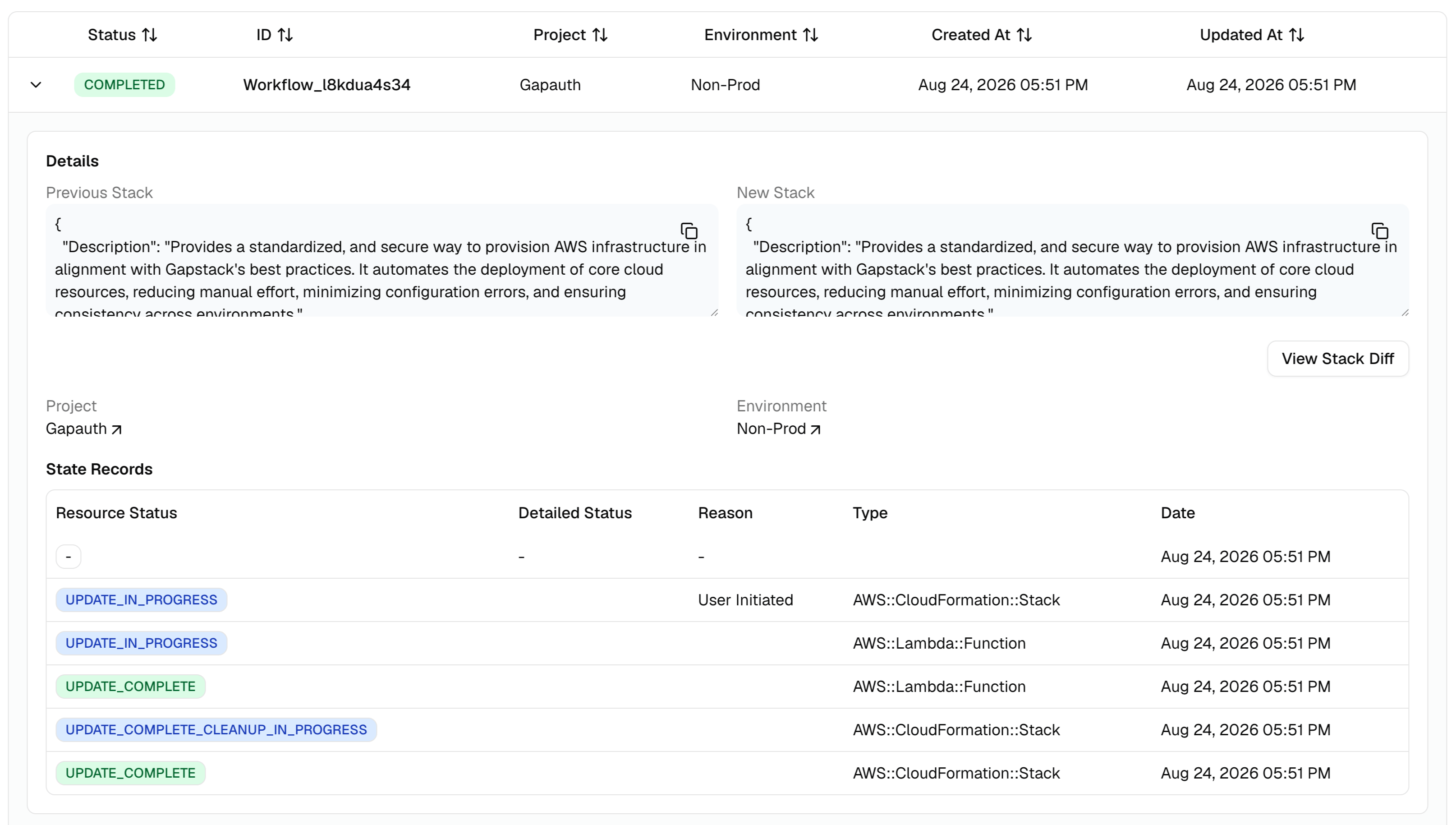
Projects do not have a CloudFormation stack. A project only groups environments. The screenshot below is an environment stack update.
## What a workflow contains
Each workflow tracks one stack operation. As CloudFormation applies the template, Gapstack records each stack event on **State Records**.
The table matches the CloudFormation event history:
* Resource status
* Detailed status
* Reason
* Type
* Date
You can also compare the previous stack and the new stack, then click **View Stack Diff**.
Open **Workflows** in the sidebar to see runs across the organization. You can also open a workflow from an environment.
 ## Workflow status
| Status | Meaning |
| ---------------------------- | ----------------------------------------------------------------------------------------------------- |
| **Pending** | The stack run has been created and has not started emitting events yet |
| **Running** | CloudFormation is applying the stack |
| **Completed** | The stack finished successfully |
| **Failed** | The stack failed. Use the event list to see which resource failed and why |
| **Rollback** | CloudFormation is rolling the stack back |
| **Manual deletion required** | AWS could not finish cleanup. Delete leftover resources in the AWS console, then continue in Gapstack |
If a workflow fails, start with the event that has a status reason. That text is the CloudFormation failure message for the resource. If this was the first deploy of the environment, see [Failed first deploy](/guides/failed-first-deploy).
## How it relates to AWS
When you deploy an environment, Gapstack assumes the IAM role from the account connection stack and creates or updates that environment's CloudFormation stack. CloudFormation writes events as each resource is created, updated, or deleted. Gapstack is subscribed to those events and writes them onto the workflow.
The same history is available in AWS on the stack **Events** tab. See [View CloudFormation stack events](https://docs.aws.amazon.com/AWSCloudFormation/latest/UserGuide/using-cfn-listing-event-history.html).
## Workflow status
| Status | Meaning |
| ---------------------------- | ----------------------------------------------------------------------------------------------------- |
| **Pending** | The stack run has been created and has not started emitting events yet |
| **Running** | CloudFormation is applying the stack |
| **Completed** | The stack finished successfully |
| **Failed** | The stack failed. Use the event list to see which resource failed and why |
| **Rollback** | CloudFormation is rolling the stack back |
| **Manual deletion required** | AWS could not finish cleanup. Delete leftover resources in the AWS console, then continue in Gapstack |
If a workflow fails, start with the event that has a status reason. That text is the CloudFormation failure message for the resource. If this was the first deploy of the environment, see [Failed first deploy](/guides/failed-first-deploy).
## How it relates to AWS
When you deploy an environment, Gapstack assumes the IAM role from the account connection stack and creates or updates that environment's CloudFormation stack. CloudFormation writes events as each resource is created, updated, or deleted. Gapstack is subscribed to those events and writes them onto the workflow.
The same history is available in AWS on the stack **Events** tab. See [View CloudFormation stack events](https://docs.aws.amazon.com/AWSCloudFormation/latest/UserGuide/using-cfn-listing-event-history.html).