> ## Documentation Index
> Fetch the complete documentation index at: https://doc.gapstack.dev/llms.txt
> Use this file to discover all available pages before exploring further.
# Environment variables
> Define variables at the project or environment level. Environment values override project values and are injected into every Lambda.
You can define environment variables at the **project** level or the **environment** level. Gapstack injects the merged set into every **Lambda** it provisions in that environment.
Use project variables for values that should apply in every environment, such as a shared API base URL. Use environment variables for values that differ per environment, such as a production secret.
 ## Priority
Gapstack starts with the project variables, then applies the environment variables.
* A project variable is available to Lambdas in every environment under that project.
* If the same name is set on the environment, the environment value wins.
* Environment variables have higher priority than project variables.
For example, if the project defines `LOG_LEVEL=info` and the `prod` environment defines `LOG_LEVEL=error`, Lambdas in `prod` receive `error`.
## Where they are injected
After you deploy the environment, Gapstack injects the merged variables into every Lambda resource in that environment. You do not add them on each function yourself.
Variables defined on the project are still injected when each environment stack is deployed.
## Add a variable
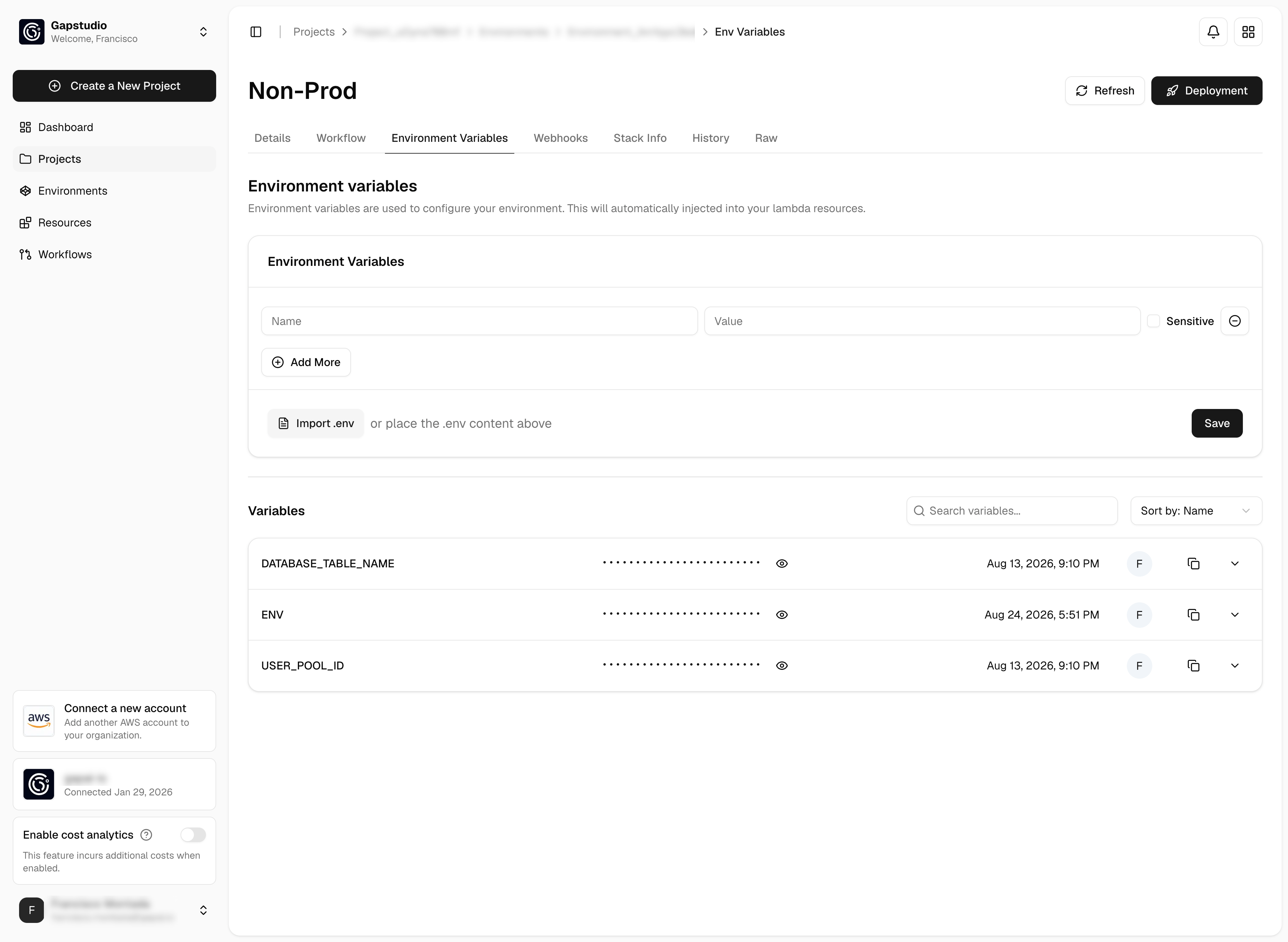
Open a **project** or an **environment**, then click **Environment Variables**.
Enter **Name** and **Value**. Select **Sensitive** if the value is a secret. Click **+ Add More** for additional rows, or **Import .env** to paste a `.env` file.
Click **Save**. Deploy the environment so Lambdas receive the updated set.
Set the same name on an environment only when you need to override the project value. Otherwise define it once on the project.
## Priority
Gapstack starts with the project variables, then applies the environment variables.
* A project variable is available to Lambdas in every environment under that project.
* If the same name is set on the environment, the environment value wins.
* Environment variables have higher priority than project variables.
For example, if the project defines `LOG_LEVEL=info` and the `prod` environment defines `LOG_LEVEL=error`, Lambdas in `prod` receive `error`.
## Where they are injected
After you deploy the environment, Gapstack injects the merged variables into every Lambda resource in that environment. You do not add them on each function yourself.
Variables defined on the project are still injected when each environment stack is deployed.
## Add a variable
Open a **project** or an **environment**, then click **Environment Variables**.
Enter **Name** and **Value**. Select **Sensitive** if the value is a secret. Click **+ Add More** for additional rows, or **Import .env** to paste a `.env` file.
Click **Save**. Deploy the environment so Lambdas receive the updated set.
Set the same name on an environment only when you need to override the project value. Otherwise define it once on the project.