> ## Documentation Index
> Fetch the complete documentation index at: https://doc.gapstack.dev/llms.txt
> Use this file to discover all available pages before exploring further.
# Duplicate an environment
> Copy resource definitions to a new environment, pick an AWS account and region, and review them before you deploy.
Click **Duplicate environment** to copy an environment. Gapstack adds the selected definitions to a new environment. You choose the AWS account and region. Use the same account or a different one.
This is useful when you build the application in a non-prod environment, then promote it to production. Production can be another AWS account or the same account in another region.
Duplicating copies definitions from one environment to another. The new environment gets its own stack when you deploy.
 ## What you can copy
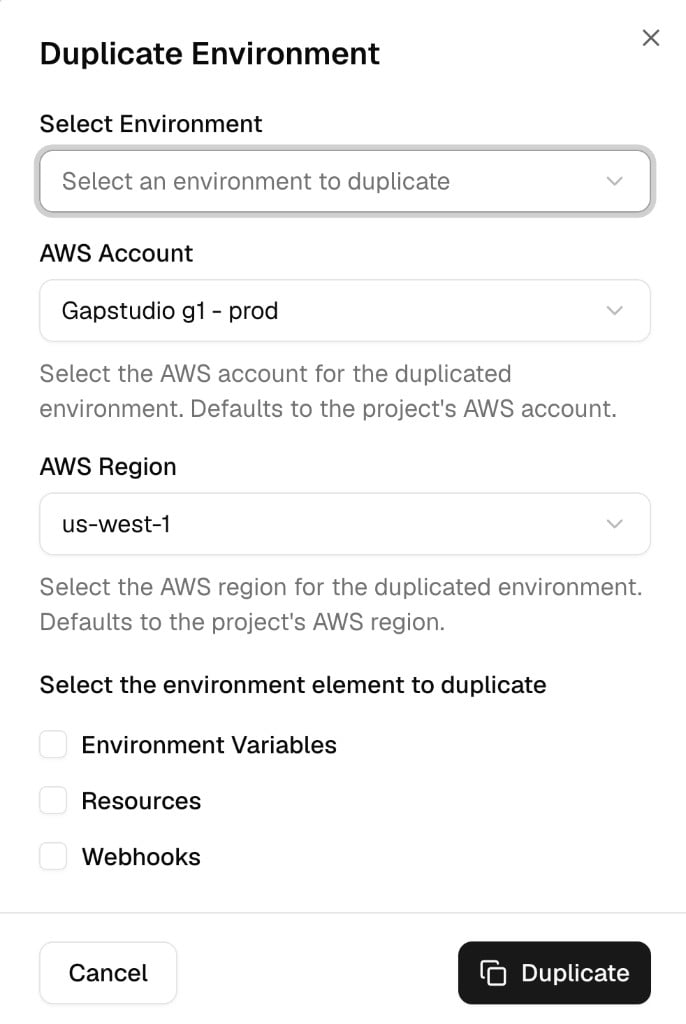
On **Select the environment element to duplicate**, choose any of these:
| Option | What is copied |
| ------------------------- | --------------------------------------------------------- |
| **Environment Variables** | Project-or-environment variables on the source |
| **Resources** | Resource definitions. They are not provisioned in AWS yet |
| **Webhooks** | Webhook subscriptions |
Select **Resources** when you want the new environment to start from the same resource definitions. You can change names and other settings before you deploy those resources.
## First deploy of a duplicate
The first deploy of the new environment creates only the two bootstrap resources Gapstack creates for every new environment:
1. The **artifacts S3 bucket**
2. The **GitHub OIDC IAM role** used to upload artifacts
The other copied resources stay defined. They are not created in AWS on that first deploy.
After the bootstrap finishes, update any names or settings you need. Then deploy again to provision the rest of the resources.
Do not expect Lambdas, APIs, and other application resources to appear in AWS on the first deploy. Review and edit the definitions first.
Click **Duplicate environment**. The **Duplicate Environment** dialog opens.
Choose the environment to duplicate.
Select the AWS account and region. The form defaults to the project's account and region. The account must already be [connected](/guides/connect-aws-account).
Select **Environment Variables**, **Resources**, and **Webhooks** as needed. Then click **Duplicate**.
The first deploy creates the artifacts bucket and the OIDC role. Watch [Workflows](/guides/workflows) until that stack completes.
Update resource names and other settings. Upload artifacts if the new environment needs them. See [Deploy a Lambda](/guides/deploy-lambda).
Deploy the environment again. Gapstack provisions the resources you left as definitions.
If that first deploy fails, see [Failed first deploy](/guides/failed-first-deploy).
## What you can copy
On **Select the environment element to duplicate**, choose any of these:
| Option | What is copied |
| ------------------------- | --------------------------------------------------------- |
| **Environment Variables** | Project-or-environment variables on the source |
| **Resources** | Resource definitions. They are not provisioned in AWS yet |
| **Webhooks** | Webhook subscriptions |
Select **Resources** when you want the new environment to start from the same resource definitions. You can change names and other settings before you deploy those resources.
## First deploy of a duplicate
The first deploy of the new environment creates only the two bootstrap resources Gapstack creates for every new environment:
1. The **artifacts S3 bucket**
2. The **GitHub OIDC IAM role** used to upload artifacts
The other copied resources stay defined. They are not created in AWS on that first deploy.
After the bootstrap finishes, update any names or settings you need. Then deploy again to provision the rest of the resources.
Do not expect Lambdas, APIs, and other application resources to appear in AWS on the first deploy. Review and edit the definitions first.
Click **Duplicate environment**. The **Duplicate Environment** dialog opens.
Choose the environment to duplicate.
Select the AWS account and region. The form defaults to the project's account and region. The account must already be [connected](/guides/connect-aws-account).
Select **Environment Variables**, **Resources**, and **Webhooks** as needed. Then click **Duplicate**.
The first deploy creates the artifacts bucket and the OIDC role. Watch [Workflows](/guides/workflows) until that stack completes.
Update resource names and other settings. Upload artifacts if the new environment needs them. See [Deploy a Lambda](/guides/deploy-lambda).
Deploy the environment again. Gapstack provisions the resources you left as definitions.
If that first deploy fails, see [Failed first deploy](/guides/failed-first-deploy).